
Architecture Overview
Before extending Numen with skills and plugins, it is worth getting to know its basic architecture: how the model perceives the world and how it calls on abilities. Then you will know which layer a new ability plugs into, and how it takes effect.
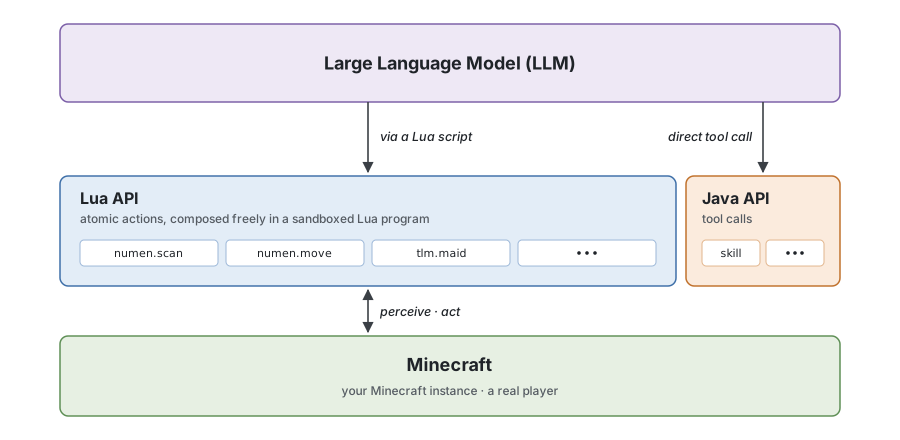
Numen is organized into three layers, from the bottom up.
The bottom layer is Minecraft, the world the agent's body lives in. Its body is a real player entity on the server, bound by the game's rules just like you: it has to walk to get somewhere, it has to dig to get blocks, its inventory has limited space, and it gets hungry and takes damage.
The middle layer is the interface opened to the model, and its main part is the Lua API. The model writes Lua programs that call these APIs and, through them, controls the player entity.
Plugins also connect other mods through this layer. But not every feature needs a new API. As a rule of thumb, anything that can be done with vanilla interactions only needs a skill that teaches the agent how to do it.
Take Touhou Little Maid as an example. To tame a maid you just right-click her while holding a cake, and the agent already has Lua APIs for scanning, moving and right-clicking with an item in hand. A skill only needs to teach it to put these actions together, like this:
-- Right-click the maid while holding a cake from the inventory, and she is tamed
numen.use.entity(maid, {item = "minecraft:cake"})
But Numen's body is a player entity on the server with no client of its own. If a screen is a standard server-side container menu, such as a chest or a furnace that you interact with only through slots, the agent can still open it with numen.use.block and work its slots with numen.gui, no plugin needed; but if the screen has buttons or text fields, or depends on state that only exists on the client, the agent cannot use it. Commands work the same way: the agent can use numen.mc.run to run any command it has permission for, no plugin needed. When it right-clicks such a block, the effects the right-click has on the server still happen as usual; only the screen does not appear. Right-clicking a tamed maid does not open the maid's screen. This is where a plugin needs to wrap the features of that screen as Lua APIs, such as switching the maid's work mode or changing her schedule. The agent never sees the screen, but the result is exactly the same as a regular player clicking through it, like this (see plugins/tlm for the full implementation):
-- 812 is the maid's entity ID, which you can read from the results of numen.scan.entities
-- Switch her work mode to farming
tlm.maid.task("touhou_little_maid:farm", {maid = 812})
-- Change her schedule: work at night, sleep during the day
tlm.maid.config(812, {schedule = "night"})
The plugin for Yes Steve Model works the same way. You might ask: Yes Steve Model already has a command for changing models, so why register a new API?
The reason is that, as of October 2026, it is still not fully open source, so we can only interact with it through commands. The agent can run commands itself with numen.mc.run, and numen.mc.run("help <command>") even lists what can be filled in next for that command. But Yes Steve Model's command for changing models requires operator permission, which the agent usually does not have, so it cannot even see the command, let alone know which models are available or what each model's ID is. It is like walking into a restaurant with no menu: you know you can order, but not what the kitchen has. So the plugin runs this command with the server's permission, targeting only the agent itself, and wraps "list the available models" and "switch to a given model" as Lua APIs for the agent to call. After switching, it also reads back the model the agent is wearing to confirm the switch really happened (see plugins/ysm for the full implementation):
-- Check the appearance info, which returns three things at once:
-- the model currently worn, the list of all models you can switch to, and the textures available for the current model
local looks = ysm.model.options()
-- Switch to a given model by its ID from the list
-- Note: use the ID (such as "misc/1_alex"), not the model's display name
ysm.model.switch("misc/1_alex")
This architecture leads to a simple principle. Whatever the server-side player entity can do on its own is best taught with a skill; whatever it cannot do, such as screens and features that only exist on the client, has to be wrapped as Lua APIs with a plugin for it to call.
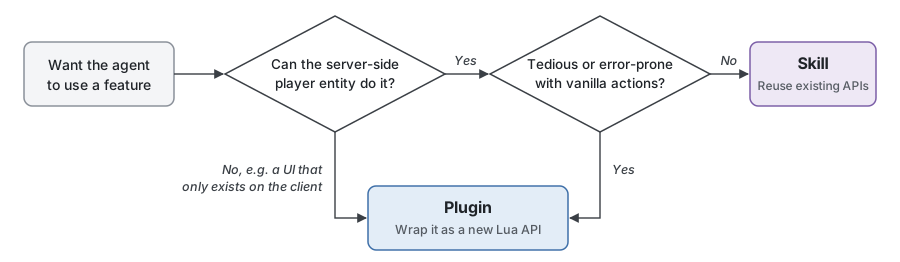
Of course, some things can be done with vanilla interactions but take many steps and are easy to get wrong. These can be wrapped as Lua APIs too, to lower the chance of the agent making mistakes.
As for how complex counts as "complex", gut feeling cannot tell. It is a trade-off. Wrap simple things as Lua APIs too, and the growing number of interfaces crowds the model's context and splits its attention; leave complex things to skills, and the model is more likely to get them wrong.
That is why Numen uses a dedicated evaluation to measure the quality of the current harness. The harness means everything outside the model, including the interfaces it is given, the skills, the prompts, and the environment its programs run in.