
Numen
Numen is an embodied agent that runs inside Minecraft. It lives in the game as a mod, continually explores the Minecraft world, makes its own decisions, and takes action to get tasks done.
Installation
Numen is published on CurseForge. Search for "Numen" in your favorite Minecraft launcher to download it. The following versions and loaders are supported:
| Minecraft version | Loaders | Java |
|---|---|---|
| 1.20.1, 1.20.2, 1.20.4 | Fabric, Forge | 17 |
| 1.20.6, 1.21, 1.21.1, 1.21.4, 1.21.5, 1.21.8, 1.21.10, 1.21.11 | Fabric, NeoForge | 21 |
| 26.1.2, 26.2 | Fabric, NeoForge | 25 |
Getting Started
- Set up a model. In game, press the key that opens the panel (
Gby default,Non 1.21.8 and later; you can change it in the game's controls settings). On the settings page, choose a model provider and enter your own API key. - Summon an agent. Summon an agent from the panel and give it a name.
- Start talking. Tell it what you want done in plain language, as you would with any agent.
Numen natively supports both the OpenAI and the Anthropic API protocols and ships with presets for a number of model providers. Any provider not on the list works too, as long as it is compatible with one of the two protocols: just enter its address.
External Brain
Numen as a whole can act as an MCP server and be driven directly by an external agent, such as Claude Code, Codex, Cursor, or any other client that supports the MCP protocol. Reasoning and token usage are then counted against the external agent, so you can drive Numen with the subscription plan of that client, which is usually cheaper than paying for API calls by usage.
Controls
| Key | Action |
|---|---|
G (N on 1.21.8 and later) | Open the panel |
Y | Type a quick message without opening the panel |
Hold R and scroll the mouse wheel | Choose which agent to talk to when you have several |
Hold V | Voice input; release to send. It does not block WASD movement |
The settings page of the panel also provides the following.
- Persona: a few simple personas are built in, and you can write any persona you like.
- Skin: set the skin of a summoned agent. Uploaded skins take effect after being signed through MineSkin.
- Voice: configure voice input and voice output, so the agent can listen and speak.
- Group chat: drag the avatars of different agents together to start a group chat. In a group chat you can @ a member to have it reply, or @ no one to broadcast to everyone.
Architecture
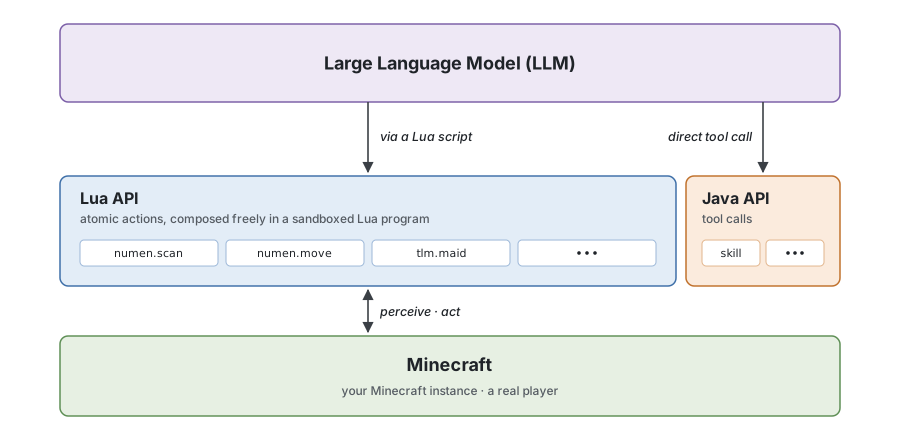
Numen is organized into three layers, from the bottom up. The bottom layer is Minecraft, where the agent controls a real player. The middle layer is the interface opened to the large language model. Its main part is the Lua API, made of atomic actions that cover perception, movement, digging, building, and interaction, and other mods can plug into it through plugins; a small Java API is also provided as tool calls, for example to load skills. The top layer is the large language model, which writes Lua programs that run in a sandbox and freely combine atomic actions, completing dozens of steps in a single call.
See the website for the architecture in more detail.
Plugins
Building on this architecture, any developer can register new Lua APIs with Numen through a plugin for the model to call, teaching the agent to use other mods. The plugins directory of this repository already provides plugins for mods such as Yes Steve Model and Touhou Little Maid. For example, the model can switch its own skin through the Lua API of Yes Steve Model, and tame maids through the Lua API of Touhou Little Maid. These plugins can serve as reference templates for writing your own. The full developer documentation is on the website.
FAQ
Is my API key safe? Yes. The agent's reasoning happens on your own client. Your API key is stored only locally and is sent directly to the model provider you chose. It never passes through any third-party server and is never uploaded to the game server.
Does it work on multiplayer servers? Yes. Numen is installed on both sides: install it on the server and on each client, and it works on multiplayer servers. Each player uses their own API key and drives their own agents.
Does it cost money? Numen itself is open source and free. Calls to the large language model use your own API key, so the cost depends on the model provider you choose.
Does the persona still apply in External Brain mode? No. In External Brain mode, an external agent takes over Numen. Numen does not hand the persona to it, and the conversation context is not saved inside Numen. To keep a persona, write it into the external agent's own prompt.
Acknowledgements
Thanks to everyone who follows, downloads, and uses Numen.